Field Notes · June 2026
Enterprise SOC Home Lab
An enterprise-inspired home lab combining segmented network infrastructure, Active Directory, secured DNS, centralized logging, endpoint telemetry, network IDS, and Wazuh monitoring.
Executive Summary
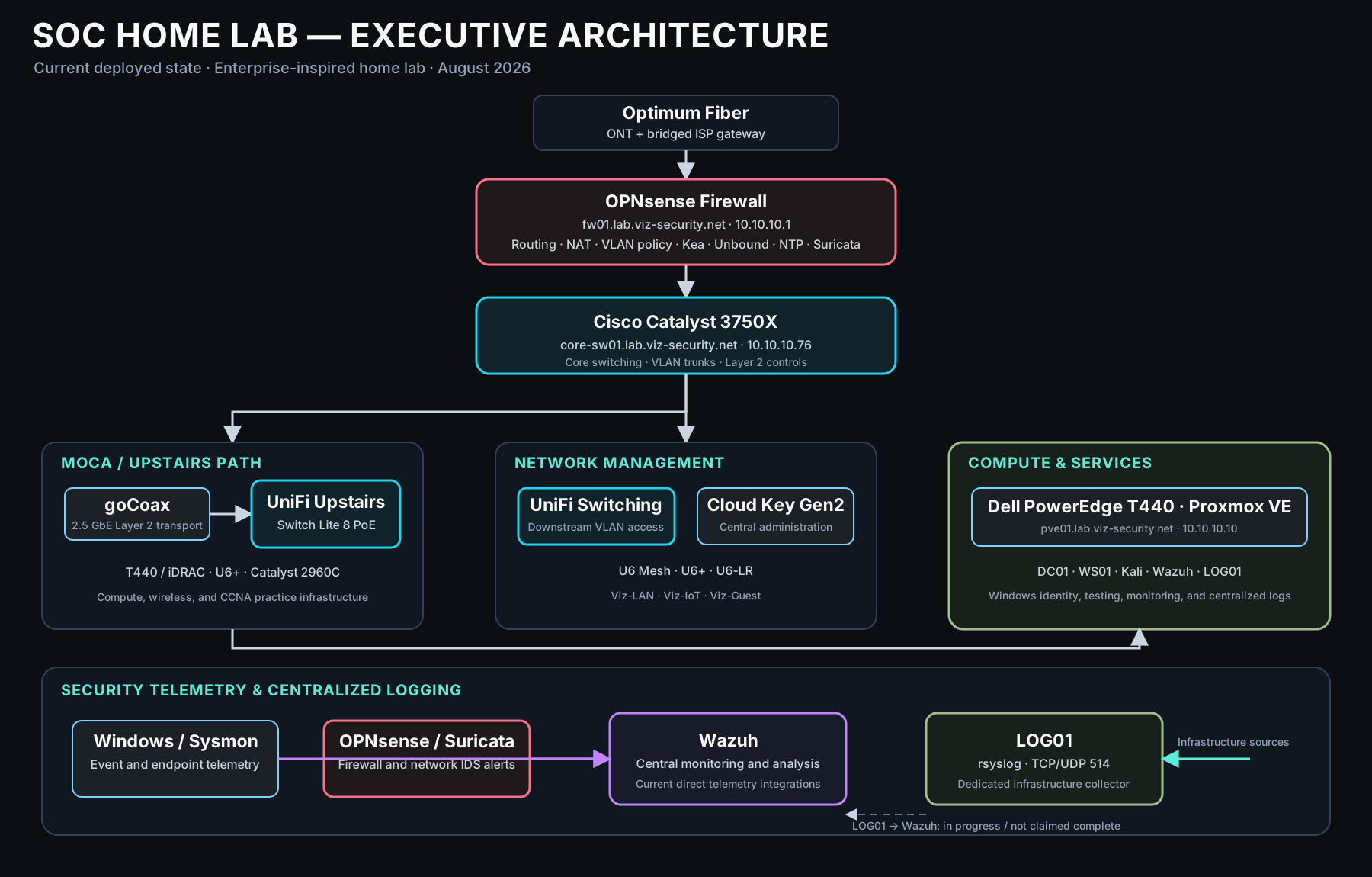
I built the Enterprise SOC Home Lab to develop cybersecurity and Network Engineering skills on infrastructure I configure, monitor, test, and troubleshoot directly. It is a home environment designed around enterprise architecture principles, not an enterprise production deployment. The current environment combines a dedicated OPNsense firewall, Cisco and UniFi switching, Proxmox virtualization, segmented VLANs, Active Directory, Windows and Linux systems, centralized DNS and NTP, infrastructure syslog collection, endpoint telemetry, network intrusion detection, and centralized security monitoring.
Wazuh is the primary SIEM/XDR platform. Sysmon provides detailed Windows endpoint telemetry, while Suricata runs on OPNsense for network intrusion detection. Both telemetry paths are integrated into Wazuh for centralized monitoring and analysis. A dedicated Kali Linux environment supports controlled attack simulation within an isolated VLAN.
| State | Scope |
|---|---|
| Deployed / current | OPNsense, Cisco Catalyst and UniFi switching, Proxmox, Active Directory, Wazuh, Sysmon, Suricata, secured DNS, centralized NTP, and the LOG01 rsyslog collector. |
| In progress / expanding | Additional infrastructure source onboarding to LOG01, further Wazuh correlation, Layer 2 hardening, DNS telemetry, and Windows Server 2025 lab work. |
| Planned / roadmap | Zeek, Microsoft Sentinel, OpenCTI, MISP, Sigma-based detection engineering, expanded Threat Hunting case studies, SSO, PKI, and broader SOC automation. |
Architecture Overview
The current physical path is Optimum Fiber ONT and bridged ISP gateway to the dedicated OPNsense appliance, then to a Cisco Catalyst 3750X core. Ethernet, MoCA, UniFi switching, wireless infrastructure, and the lab compute environment connect downstream. OPNsense remains the primary router, firewall, and inter-VLAN policy enforcement point.
Technical Architecture
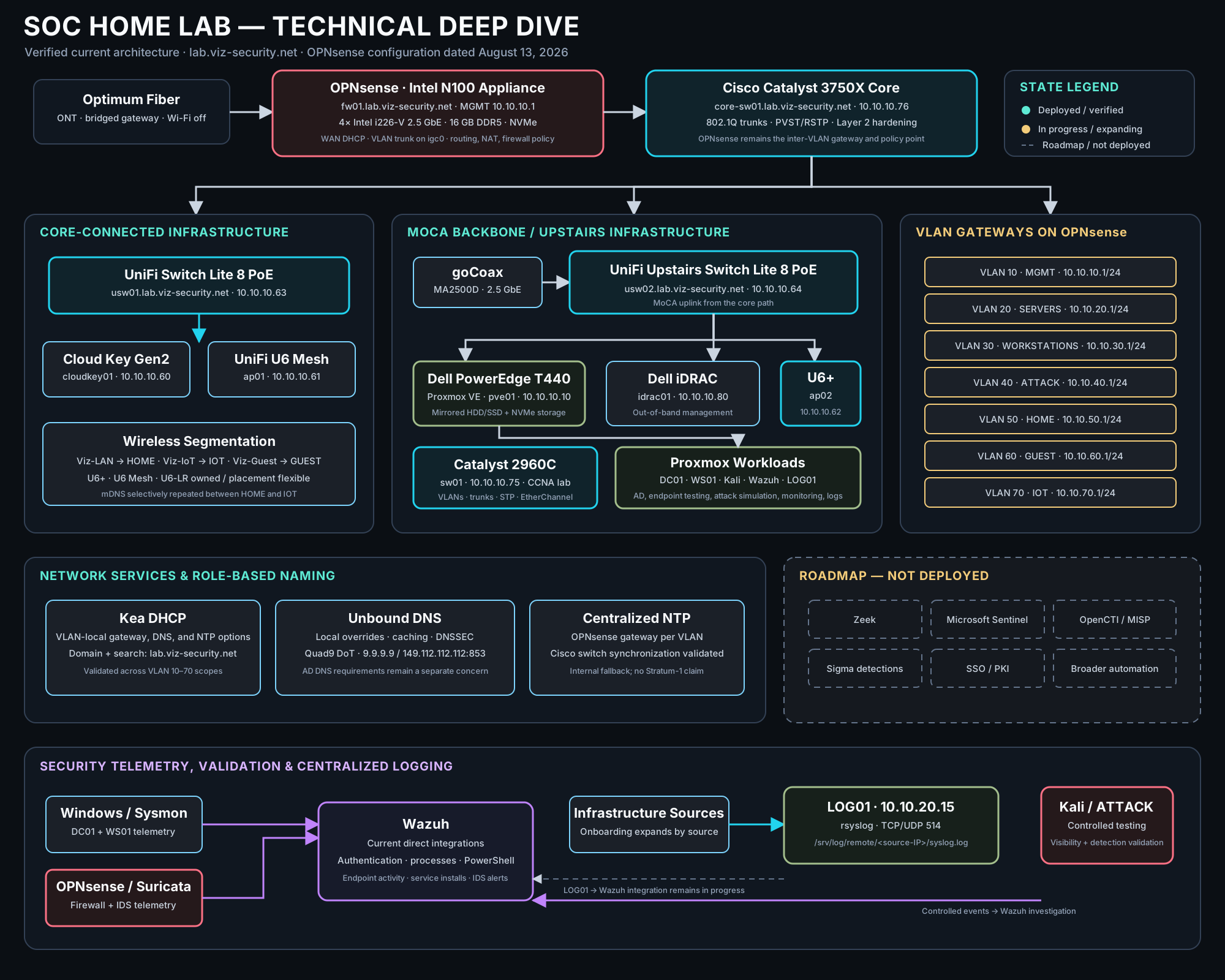
The technical topology places the Catalyst 3750X behind OPNsense, with the Catalyst 2960C, UniFi switches, MoCA transport, access points, and Dell PowerEdge T440 downstream. It also separates current Wazuh integrations from LOG01 source onboarding and the not-yet-complete LOG01-to-Wazuh path.
Objectives
- Develop practical experience with enterprise-inspired network segmentation and firewall policy.
- Operate Active Directory, Windows Server, Windows 11, and Linux systems in a controlled environment.
- Centralize Sysmon endpoint telemetry and Suricata network alerts in Wazuh.
- Monitor network activity with Suricata on OPNsense.
- Engineer centralized DNS, infrastructure naming, NTP, and syslog services.
- Practice controlled attack simulation from an isolated Kali Linux environment.
- Validate changes through service, connectivity, ingestion, rotation, and reboot testing.
Hardware Overview
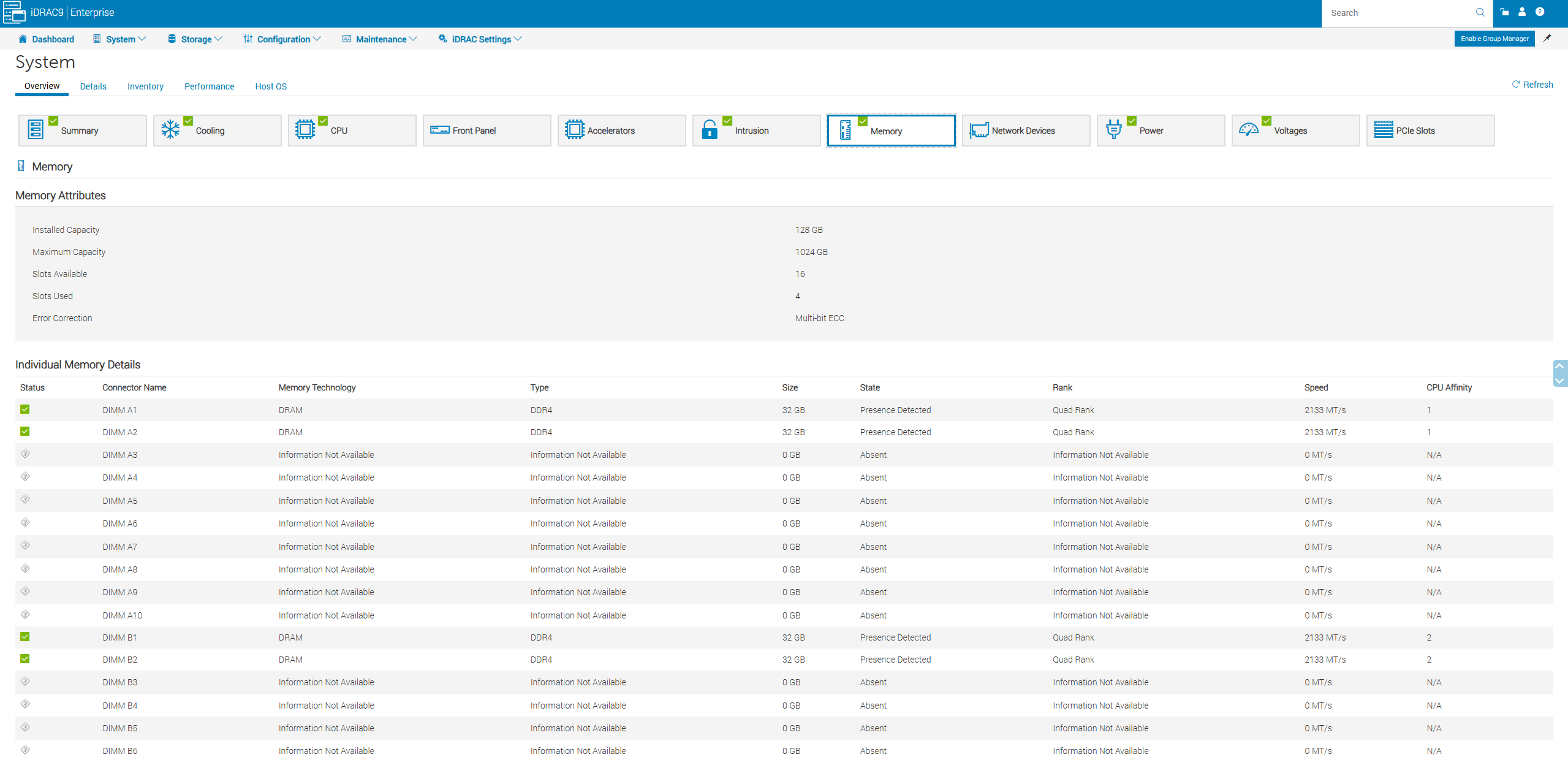
- Dell PowerEdge T440: primary Proxmox compute platform, using mirrored Seagate storage, mirrored Samsung 870 QVO 2 TB SSDs, and NVMe storage for higher-performance workloads. Dell iDRAC provides out-of-band management.
- Intel N100 firewall appliance: dedicated OPNsense platform with four Intel i226-V 2.5 GbE interfaces, 16 GB DDR5 memory, and NVMe storage.
- Cisco Catalyst 3750X: current core switching platform behind OPNsense.
- Cisco Catalyst 2960C: physical CCNA practice platform for switching, VLANs, 802.1Q trunks, spanning tree, EtherChannel, and troubleshooting exercises.
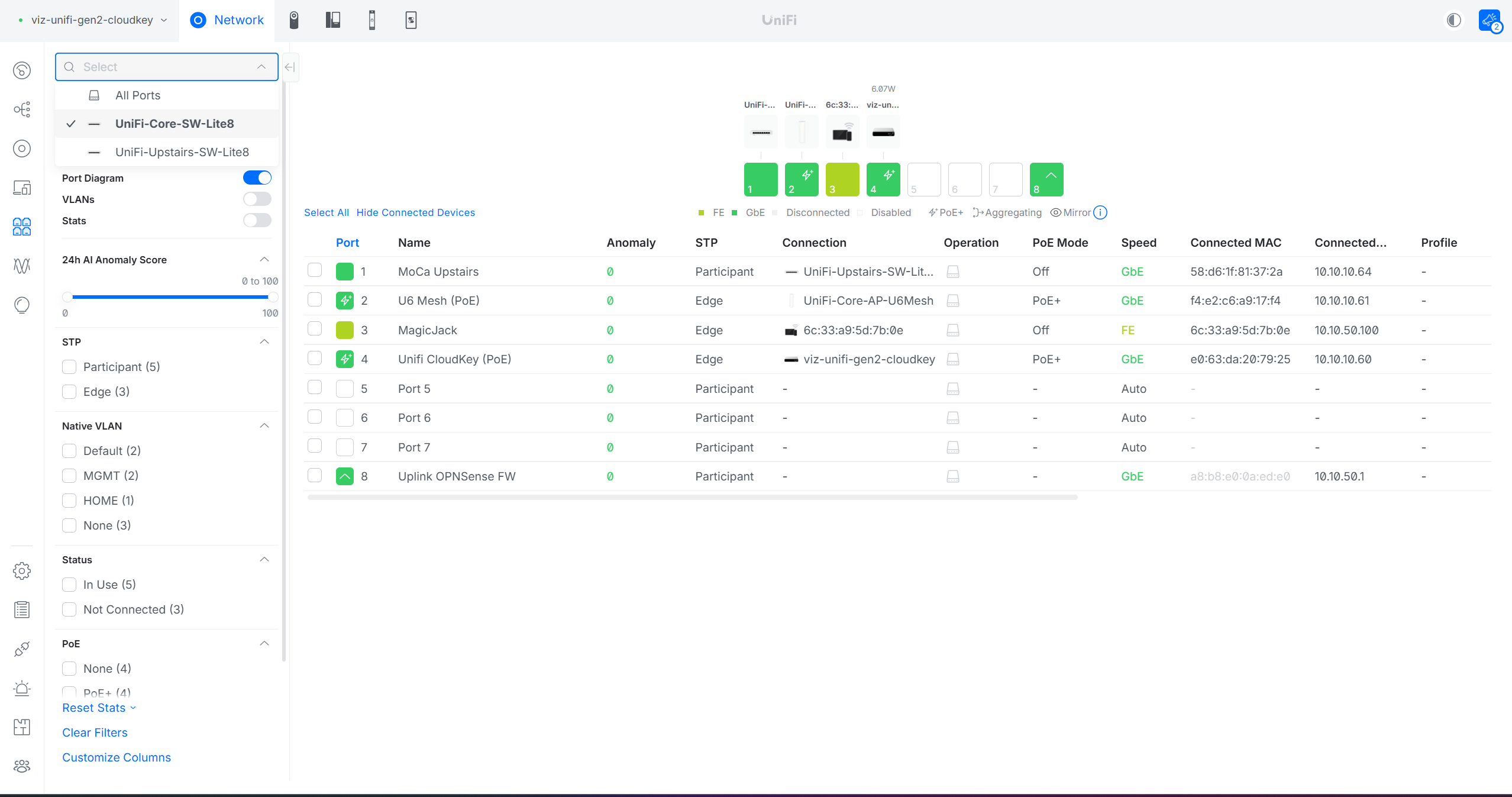
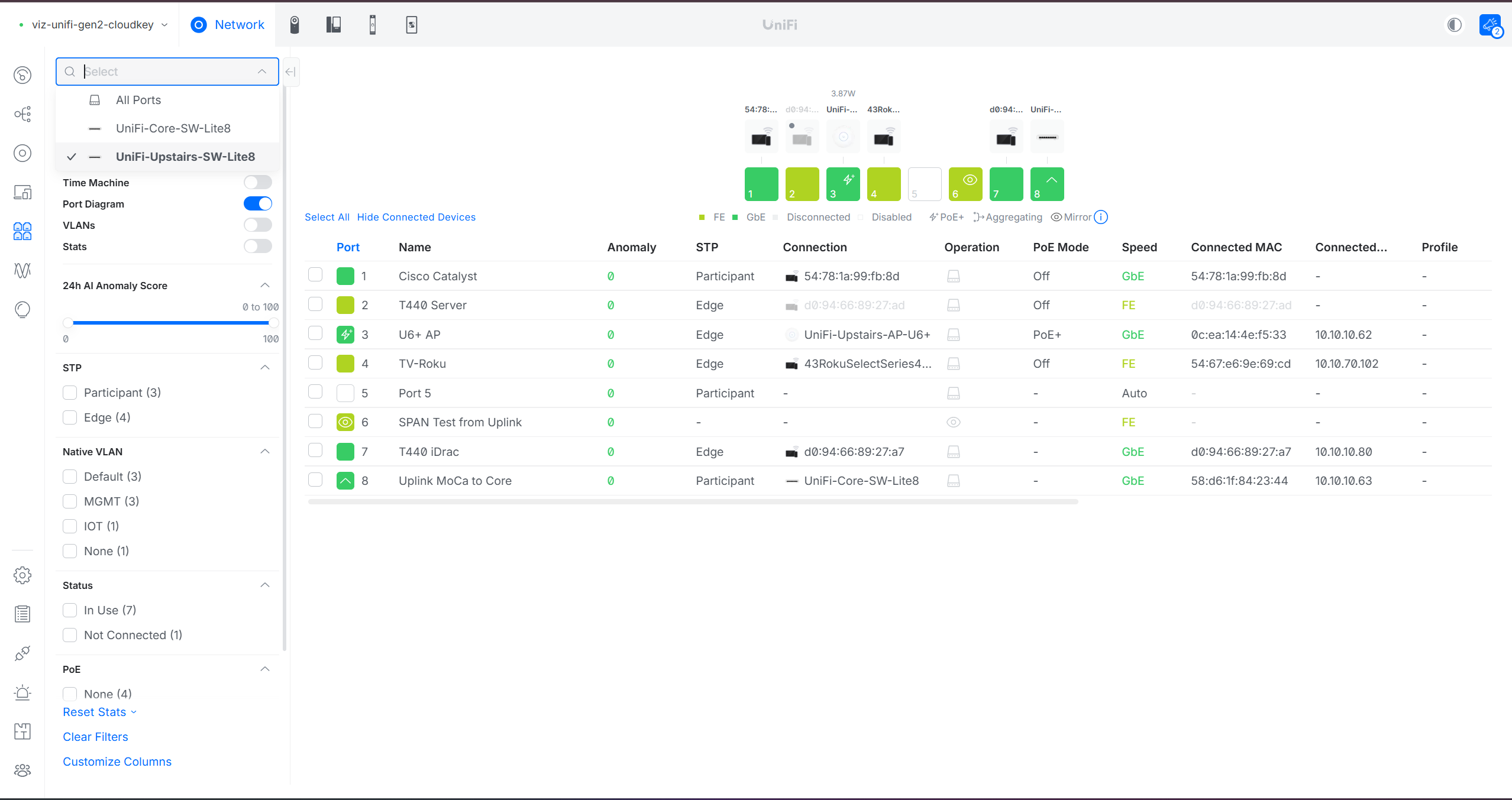
- UniFi Switch Lite 8 PoE infrastructure: downstream switching, PoE delivery, and VLAN connectivity.
- UniFi U6+, U6 Mesh, and U6-LR: owned wireless infrastructure. The U6-LR may be repositioned as coverage requirements evolve.
- goCoax MA2500D adapters: 2.5 GbE MoCA links that extend Layer 2 connectivity over existing coax where direct Ethernet is unavailable.
Virtualization Architecture
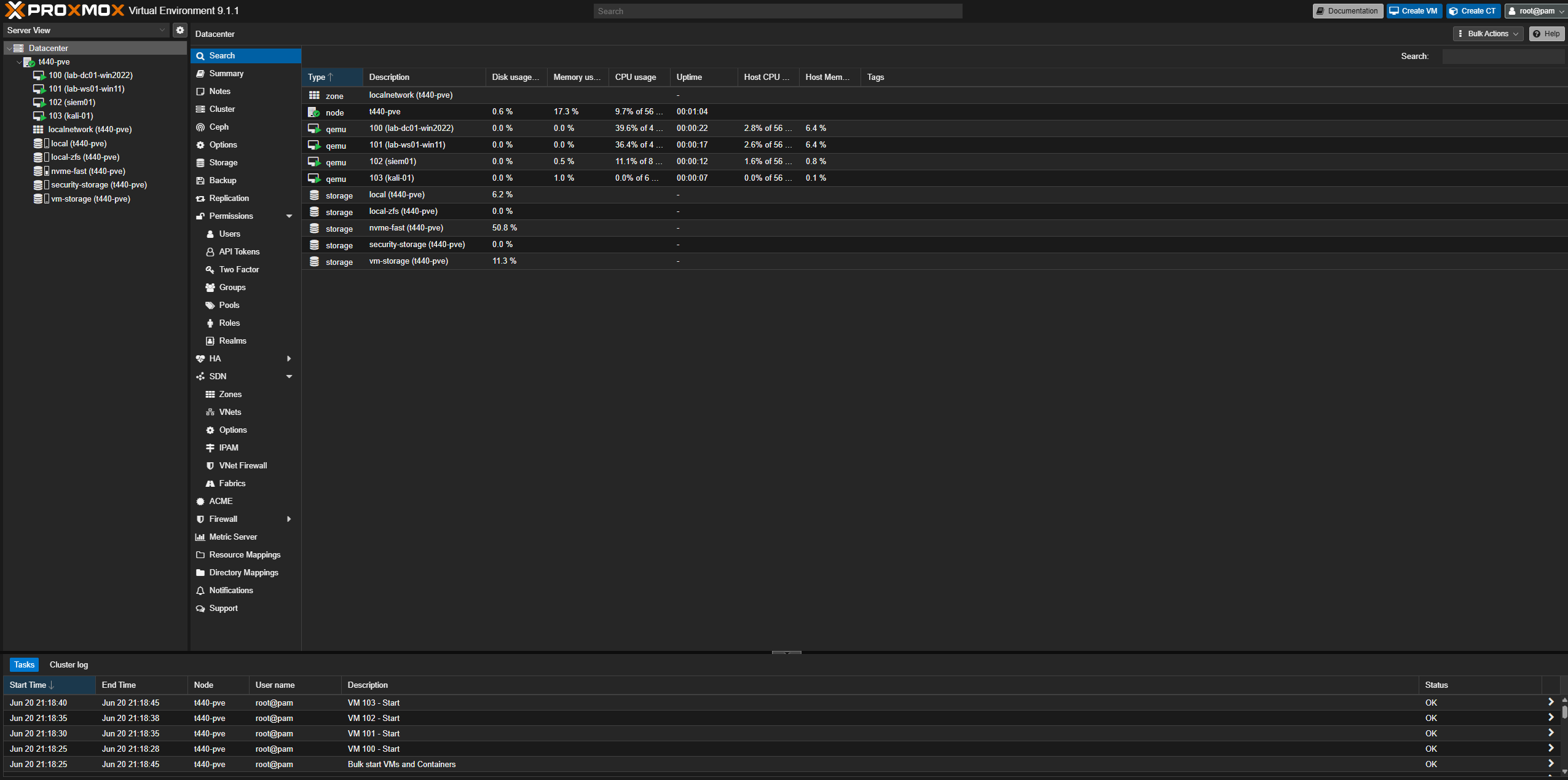
Proxmox on the Dell PowerEdge T440 hosts DC01, WS01, Kali Linux, Wazuh, LOG01, and related lab workloads. DC01 runs Windows Server 2022 Evaluation and provides Active Directory Domain Services; WS01 is a Windows 11 domain client used for administration and security testing. The existing Active Directory environment has used lab.local, which remains distinct from the general infrastructure DNS namespace described below.
OPNsense remains on dedicated hardware so routing, firewall policy, DNS, DHCP, NTP, and Suricata monitoring are separated from the primary virtualization host.
This design lets me work across server administration, identity, networking, endpoint monitoring, and network security without presenting the environment as a production enterprise deployment.
VLAN Architecture
| VLAN | Purpose | Subnet |
|---|---|---|
| 10 | Management | 10.10.10.0/24 |
| 20 | Servers | 10.10.20.0/24 |
| 30 | Workstations | 10.10.30.0/24 |
| 40 | Attack | 10.10.40.0/24 |
| 50 | Home | 10.10.50.0/24 |
| 60 | Guest | 10.10.60.0/24 |
| 70 | IoT | 10.10.70.0/24 |
OPNsense handles inter-VLAN routing and firewall administration. Management systems can reach infrastructure where required, workstation access to management is restricted, and Guest and IoT networks are isolated. mDNS is selectively permitted where a specific service such as AirPrint requires it. The design does not represent NAC, identity-aware policy, or full microsegmentation.
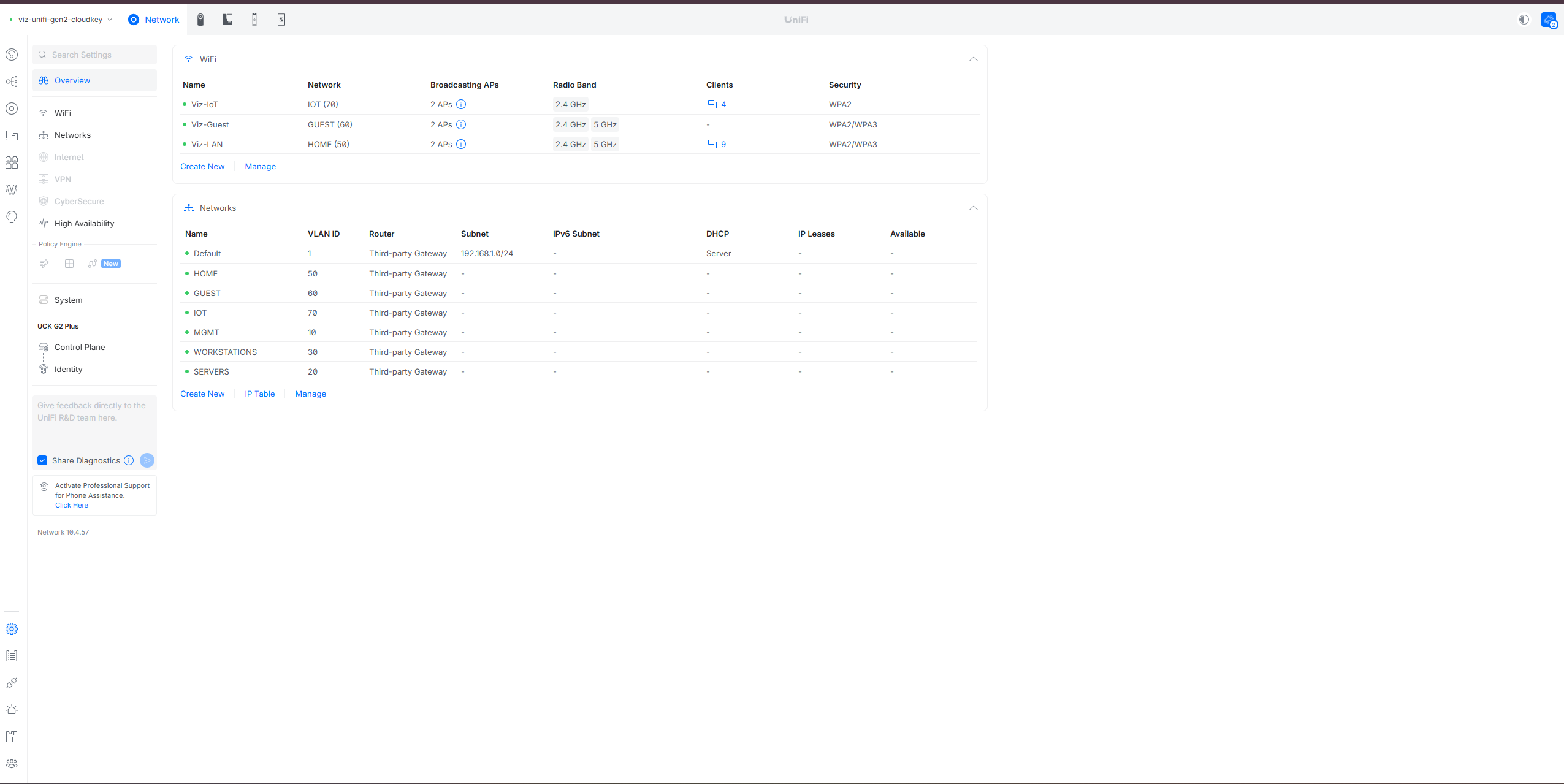
The current wireless mappings include Viz-LAN, Viz-IoT, and Viz-Guest, placing trusted/home, IoT, and guest devices into their intended segments. Across the switching lab, VLANs, 802.1Q trunks, spanning-tree interoperability, EtherChannel variants, DHCP Snooping, Dynamic ARP Inspection, NTP, and hardening are configured, tested, or studied as scoped exercises; they are not presented as uniformly enabled on every switch port.
Network Services & Infrastructure Naming
To replace inconsistent device-local naming with predictable service access, OPNsense provides Kea DHCP, Unbound DNS, and centralized NTP. Kea distributes lab.viz-security.net as the Domain Name and Domain Search suffix, allowing a short role-based hostname such as fw01 to resolve as fw01.lab.viz-security.net. This behavior was validated during implementation.
Unbound is the primary resolver for the general lab network and provides caching, local infrastructure records, and host overrides. Upstream resolution uses Quad9 over DNS-over-TLS, with DNSSEC enabled. Active Directory systems retain the DNS behavior required by AD; the general infrastructure namespace and the existing AD namespace are deliberately treated as separate concerns.
Validated infrastructure identities include fw01.lab.viz-security.net (10.10.10.1) for OPNsense, idrac01.lab.viz-security.net for Dell iDRAC, and log01.lab.viz-security.net (10.10.20.15) for the centralized syslog server. Additional role-based records are introduced only as their configuration and validation are completed.
OPNsense also provides NTP to lab segments, generally through the firewall interface for each VLAN. Cisco switching infrastructure has been configured and validated against this centralized time source. The design includes internal fallback behavior, not a dedicated Stratum-1 or GPS-backed service.
Security Tooling
- Wazuh: primary SIEM/XDR platform for centralized security monitoring.
- Sysmon: deployed on Windows endpoints, with its detailed process and system telemetry integrated into Wazuh.
- Suricata: running on OPNsense, with network IDS alerts integrated into Wazuh.
- OPNsense telemetry: firewall and network-security events integrated into Wazuh alongside Suricata alerts.
- LOG01: dedicated Linux rsyslog collector for centralized infrastructure logging.
- Active Directory: identity and Windows domain services for administration and security testing.
Centralized Logging (LAB-002)
Infrastructure logs were previously distributed across individual systems, so I deployed LOG01 on the Servers VLAN as a dedicated collection layer. The server uses log01.lab.viz-security.net at 10.10.20.15 and accepts remote syslog over both UDP/514 and TCP/514.
rsyslog stores remote messages under /srv/log/remote/<source-IP>/syslog.log, preserving source attribution without claiming hostname-based storage that has not been implemented. Collector-side work has included remote directory creation, filesystem permissions, AppArmor handling, service persistence, and continued-ingestion testing.
Retention is configured through /etc/logrotate.d/lab002-remote-syslog with daily rotation, 30 retained rotations, compression, and delayed compression. Testing confirmed that new messages continued to be written after rotation and that collection persisted after reboot. The collector is operational; onboarding every intended network and infrastructure source, and any eventual LOG01-to-Wazuh pipeline, remain separate in-progress phases.
Detection & Monitoring Capabilities
Windows endpoints send Sysmon telemetry to Wazuh, and Suricata sends network IDS alerts from OPNsense to the same centralized monitoring platform. The collected data supports investigation of authentication activity, process creation, PowerShell execution, service installation events, broader endpoint activity, and network IDS alerts.
Controlled testing originates from the Kali system on the dedicated attack VLAN. I use that activity to validate detections, identify visibility gaps, and develop Threat Hunting skills by comparing endpoint and network evidence in Wazuh. This is a controlled learning environment rather than enterprise-scale monitoring coverage.
Attack Simulation Environment
Kali Linux provides the attack simulation platform on VLAN 40. Keeping attack infrastructure on a dedicated VLAN supports controlled testing and reinforces segmentation, routing, firewall, and monitoring concepts. Testing remains limited to systems I own and administer inside the lab.
Lessons Learned
- VLAN tagging mistakes can prevent clients from reaching the intended DHCP scope, making switch-port configuration an essential part of troubleshooting apparent addressing failures.
- Trunk and access port mismatches require validating the full path between endpoints, switch uplinks, access points, and OPNsense rather than troubleshooting each device in isolation.
- Migrating from Netgear switching to UniFi switching required revalidating VLAN assignments, tagged uplinks, and access-port behavior instead of assuming configurations would translate directly between platforms.
- Running Suricata on OPNsense reduced the need to maintain a separate sensor VM and kept network inspection alongside the firewall and routing configuration.
- Segmentation improves isolation but introduces operational dependencies across VLAN tagging, DHCP, DNS, routing, and firewall policy that must be documented and tested together.
- Combining Sysmon endpoint telemetry with Suricata network alerts provides more investigative context than relying on either telemetry source alone.
- Separating the general infrastructure namespace from the Active Directory namespace avoids treating unrelated DNS requirements as one migration problem.
- Centralized logging requires more than opening port 514: storage permissions, AppArmor behavior, rotation, and post-reboot ingestion all need independent validation.
Operational Evidence
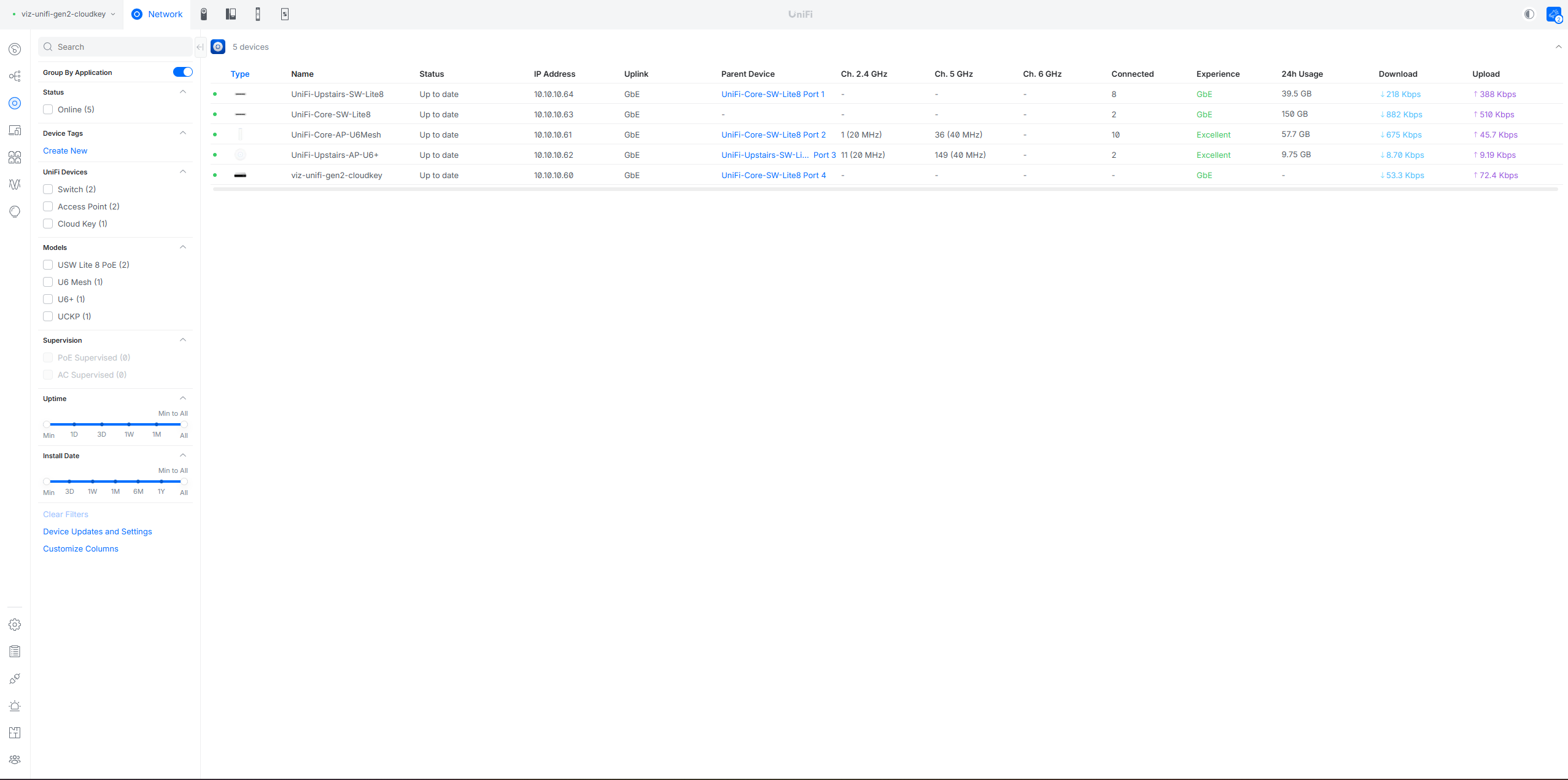
The screenshots below document virtualization, network segmentation, switching, intrusion detection, Wazuh analysis, and server hardware. Some UniFi port views capture the earlier UniFi-centered topology and are retained as implementation history; the current architecture is documented in the diagrams above. Select an image to open the full-resolution view.
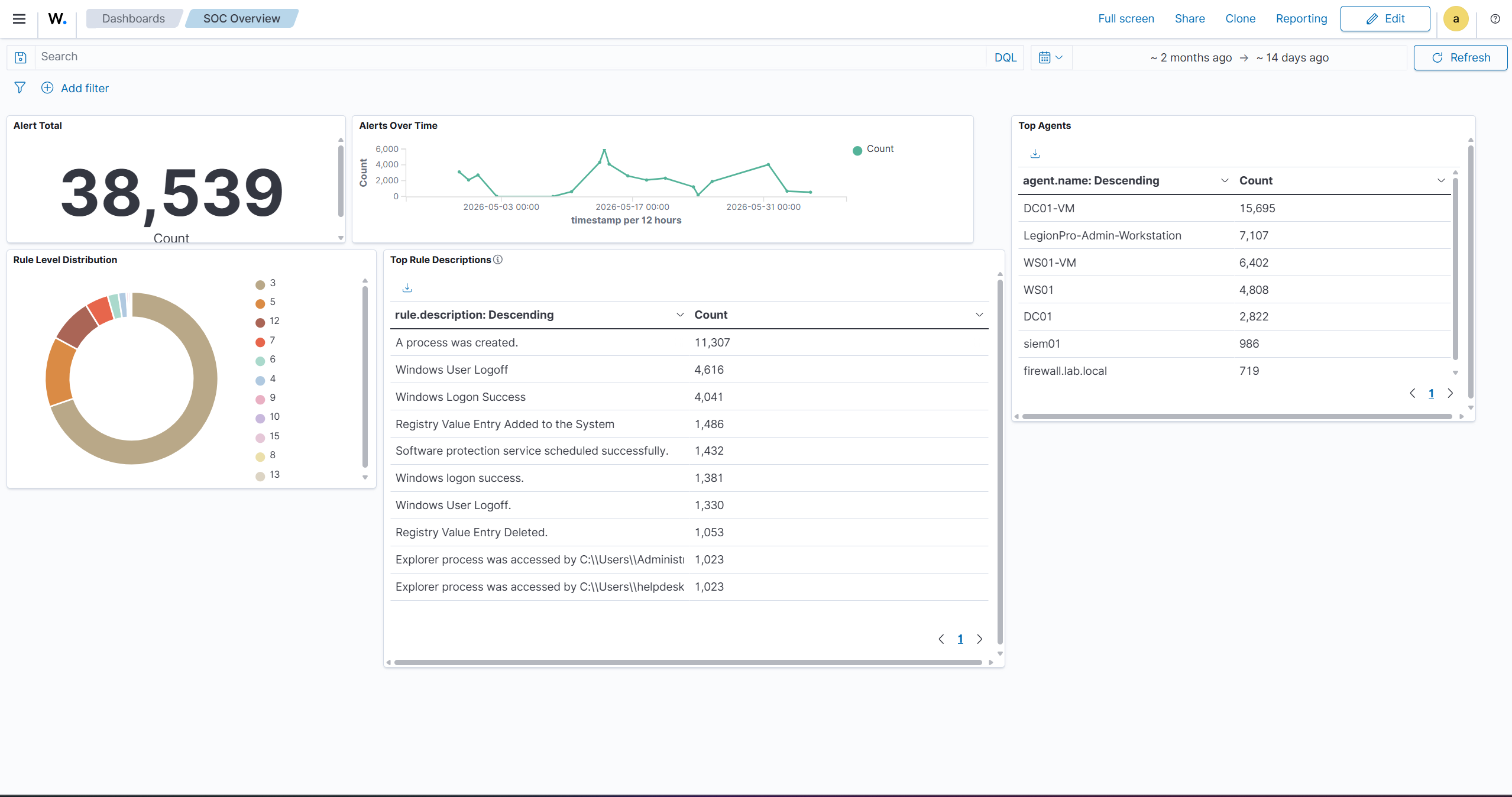
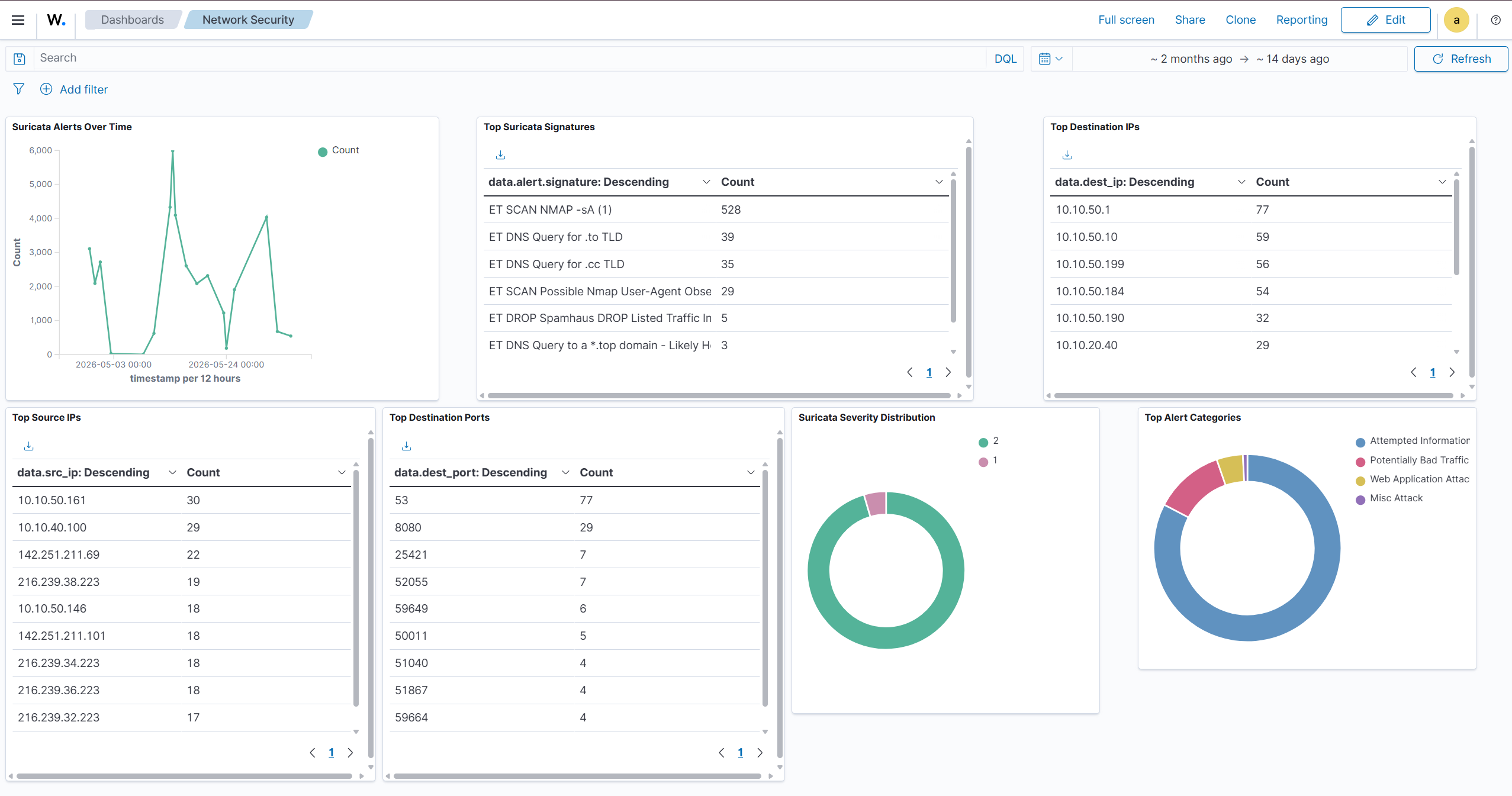
The Wazuh SOC Overview and Network Security dashboards were built from Wazuh alert indexes containing Windows and Sysmon endpoint events, OPNsense firewall events, and Suricata network IDS telemetry. They provide focused views for reviewing alert volume, endpoint activity, network signatures, and the systems generating security events.
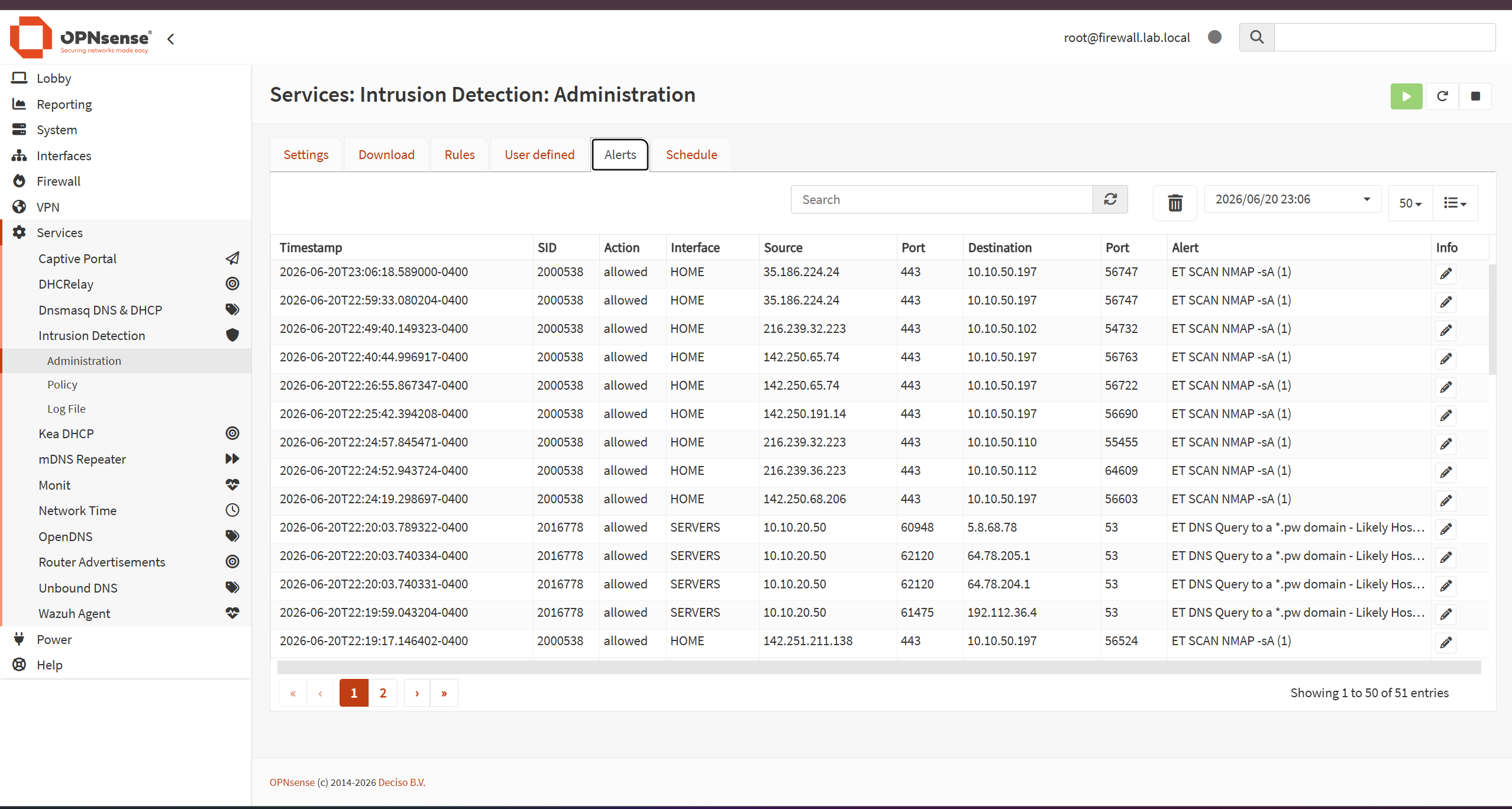
firewall.lab.local label is historical; the current infrastructure identity is fw01.lab.viz-security.net.
Future Improvements
- Onboard additional infrastructure sources to LOG01 and validate each source independently.
- Evaluate a future LOG01-to-Wazuh ingestion path without conflating collector readiness with SIEM integration.
- Add Zeek through SPAN/port mirroring for passive network metadata and protocol logging.
- Evaluate OpenCTI and MISP for future threat-intelligence enrichment.
- Explore Microsoft Sentinel through SC-200 and future cloud/hybrid SOC lab work.
- Develop Sigma-based detections and repeatable validation exercises.
- Build documented Active Directory attack-and-defend scenarios and Threat Hunting case studies.
- Expand Windows Server 2025 training without representing it as a replacement for the current Server 2022 domain controller.
- Evaluate identity/SSO and PKI/certificate-lifecycle projects as separate future implementations.
- Develop additional n8n and broader SOC automation workflows after the underlying telemetry and logging paths are validated.